For projects you run with Claude, Codex or ChatGPT

Every project. One clear view.

Project HQ reads the project folders you and Claude, Codex or ChatGPT already work in. It shows what's done, what's next and which decisions are waiting on you.

One email when it's on sale. No spam.

Not on sale yet. Join the waitlist and you'll hear when it is.

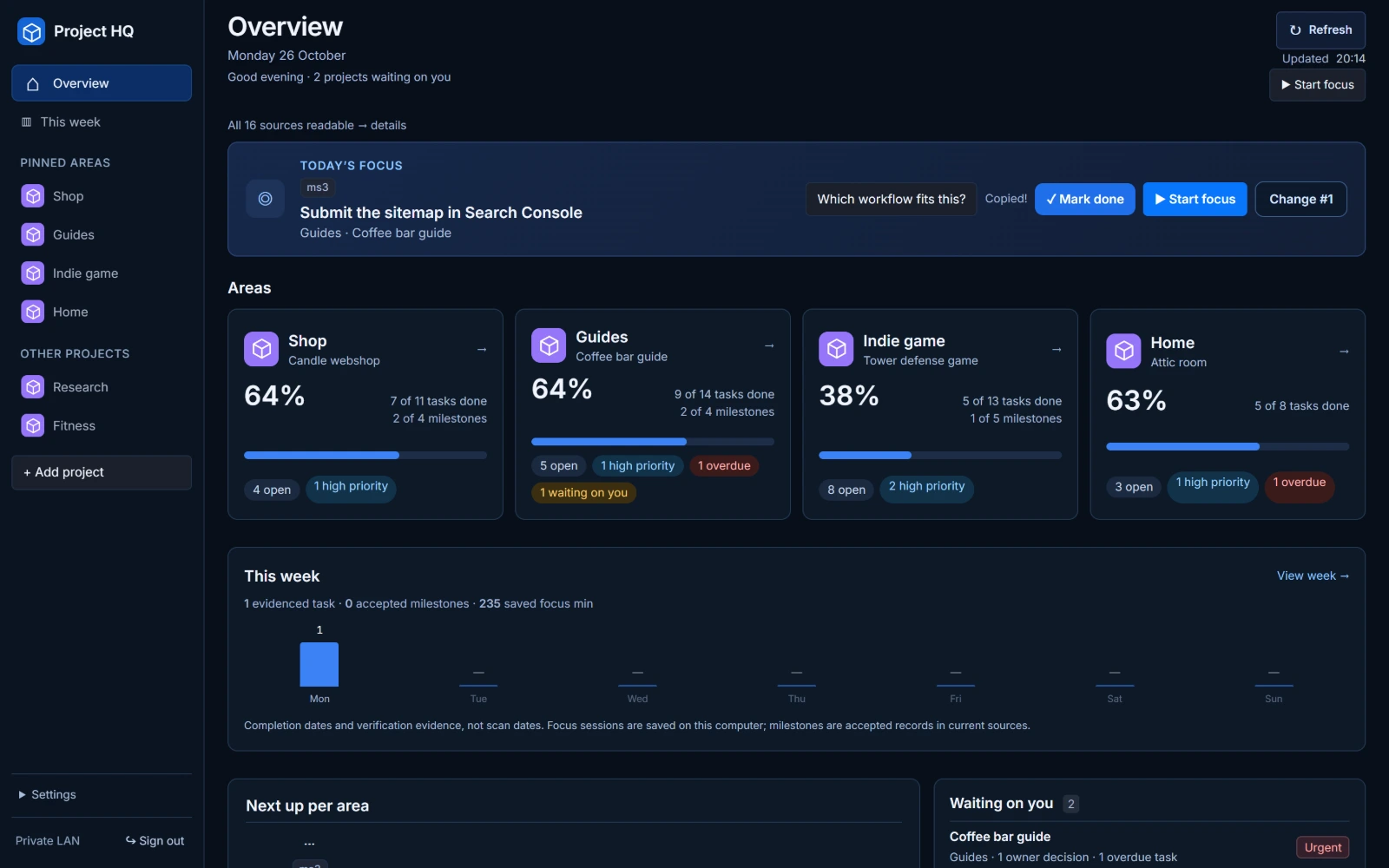
With Project HQ: the Overview, with every project's progress, what's next and which decisions are waiting on you (made-up demo projects)
The Overview: every area, its progress, what's next and which decisions are waiting on you. The projects are made up for this page.

Project HQ in four facts

  • €37Once, incl. VAT
  • WindowsWindows PC only
  • Your PCRuns locally, no cloud
  • Your AIWorks with Claude, Codex or ChatGPT

Sound familiar?

Today

Running several projects with AI

  • Every project lives in its own folder, with its own notes and chats
  • You open five places to see how far one project is
  • Your AI did a lot this week, but what is actually finished?
  • A decision only you can make sits in a chat, waiting

With Project HQ

Project HQ answers three questions
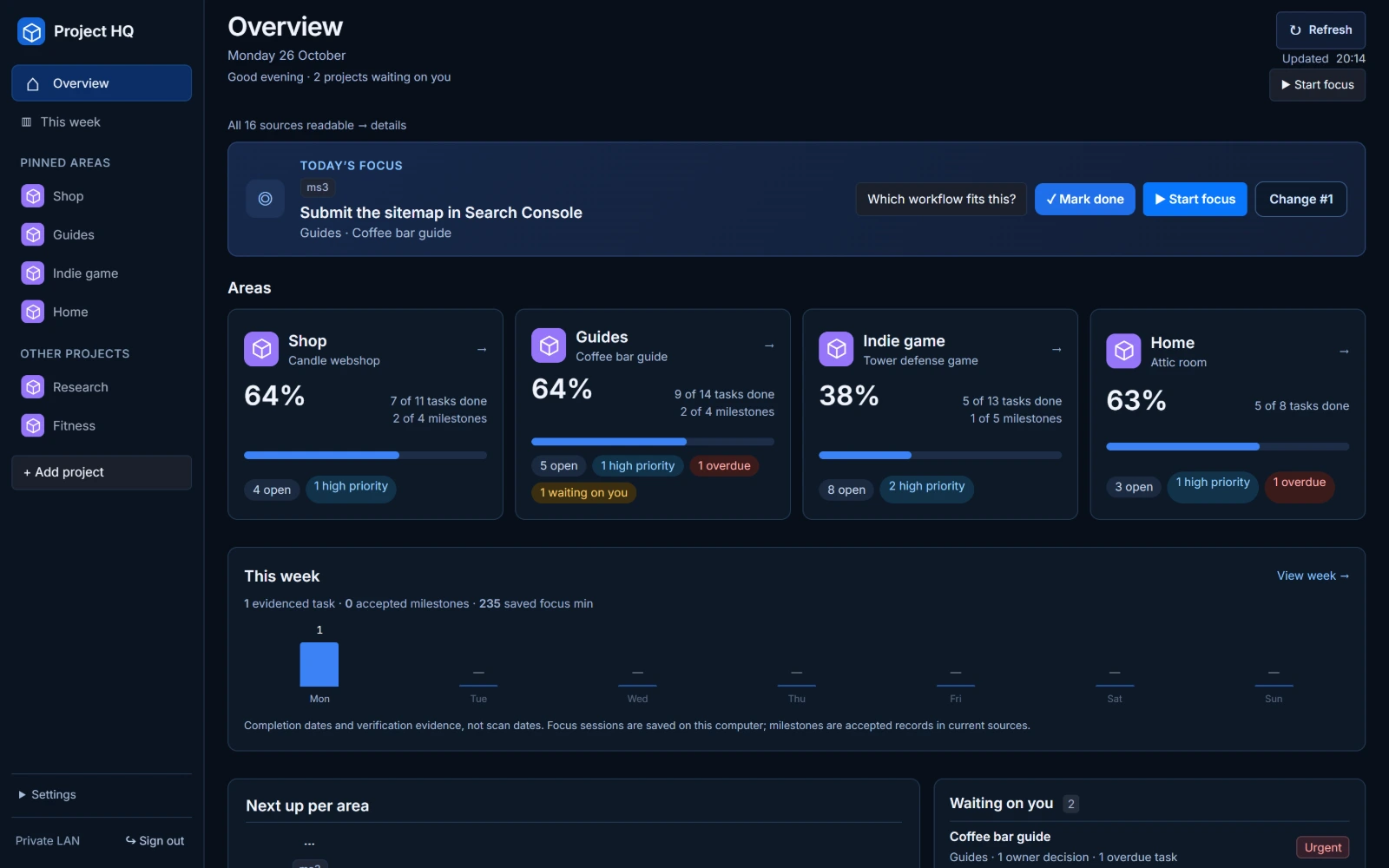
  • How far along is each project?
  • What should I do next?
  • What is waiting for my decision?

On one screen, straight from your project files.

How it works

  1. 1

    Add your project folders

    Install Project HQ on your Windows PC and add the folders your projects already live in.

  2. 2

    Your AI keeps the status current

    Project HQ gives you a setup prompt for Claude, Codex or ChatGPT. Your assistant writes a small status file in each project and keeps it up to date as it works.

  3. 3

    Open one screen

    See progress, next steps and decisions for every project. Mark a task done in one click, or hand a project to your AI with a ready prompt.

What you see

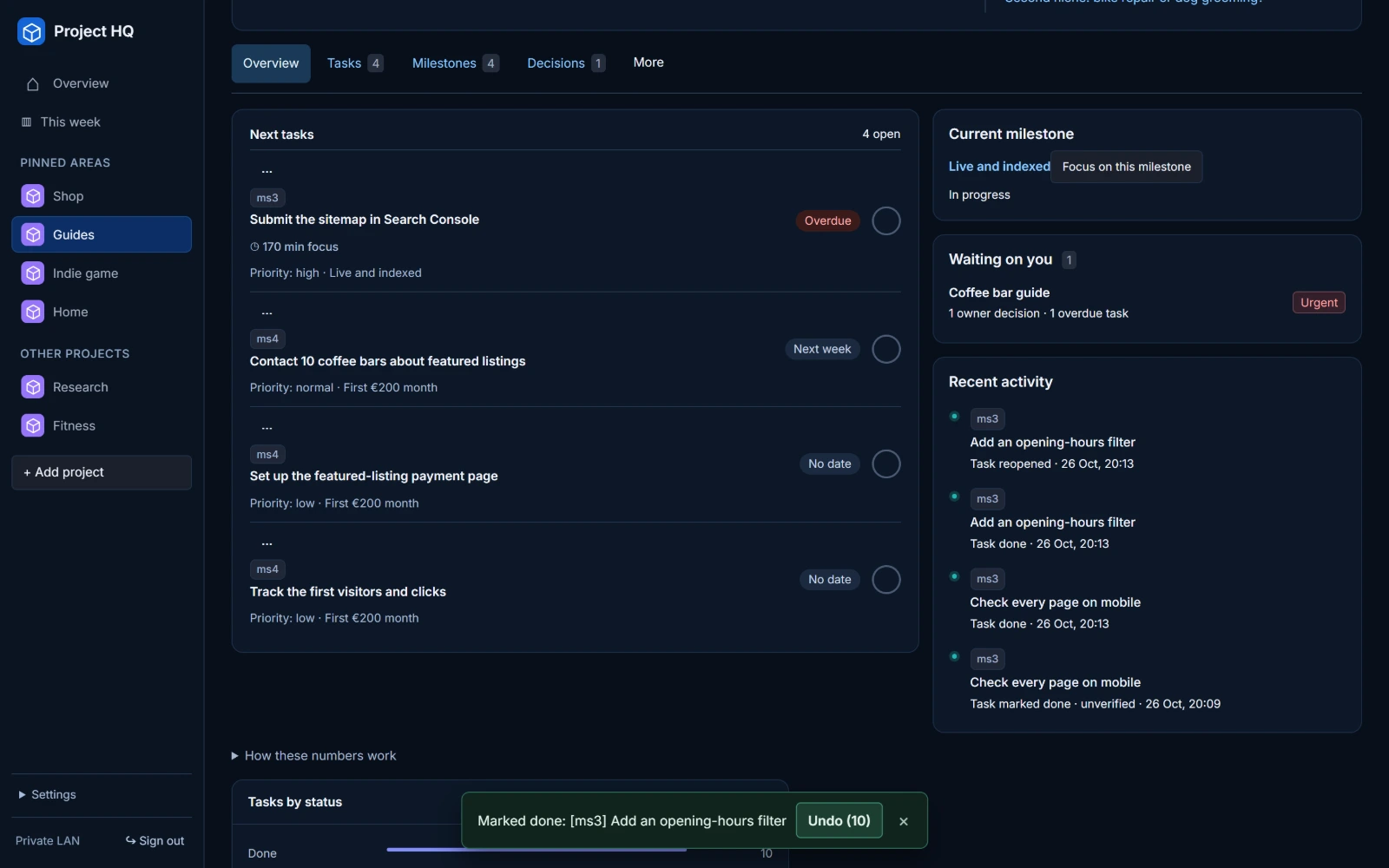
Project page for a made-up coffee bar guide right after a task was marked done: the Next tasks list, the recent activity and a message at the bottom that offers Undo (demo data)
See the full screenshot →

Done in one click. Undo in one move.

Tick a task in any list. Project HQ saves it to the project file, offers Undo for 10 seconds and updates the progress.

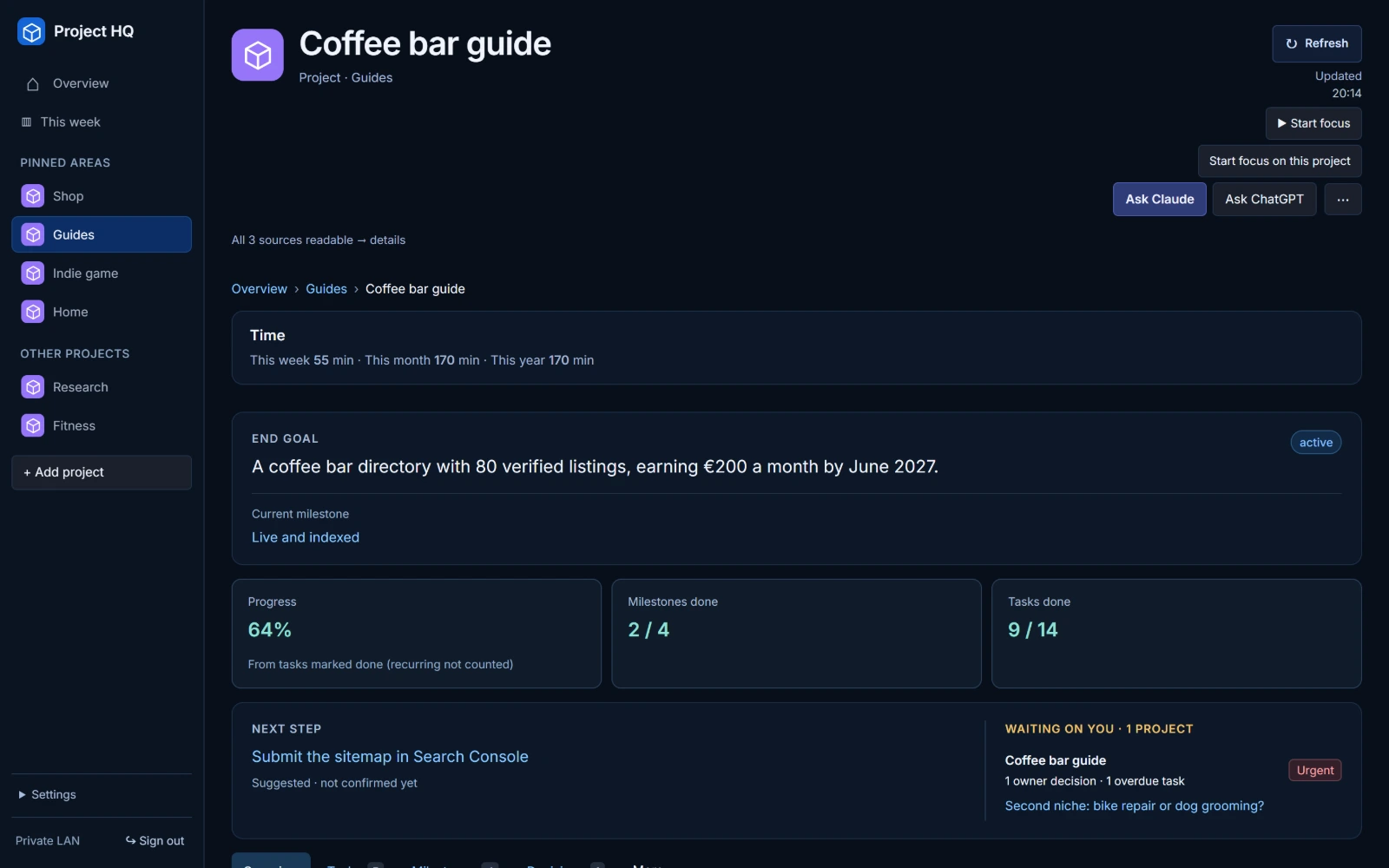
Project page for a made-up coffee bar guide: end goal, current milestone, progress, milestones and tasks done, next step, a decision waiting and the Ask Claude, Ask ChatGPT and Start focus buttons (demo data)
See the full screenshot →

Goal. Progress. Next step.

Every project gets its own page: the end goal, the current milestone, progress from tasks marked done, the next step and the decisions that need you.

The Overview with today's focus task: the Which workflow fits this? button shows Copied, next to Mark done and Start focus (demo data)
See the full screenshot →

Hand any project to Claude or ChatGPT.

Ask Claude and Ask ChatGPT copy a ready prompt with the goal, current milestone, next step, open tasks and decisions. You paste it into your assistant. Project HQ itself never calls an AI. Which workflow fits this? copies a prompt that helps you choose how to run a task.

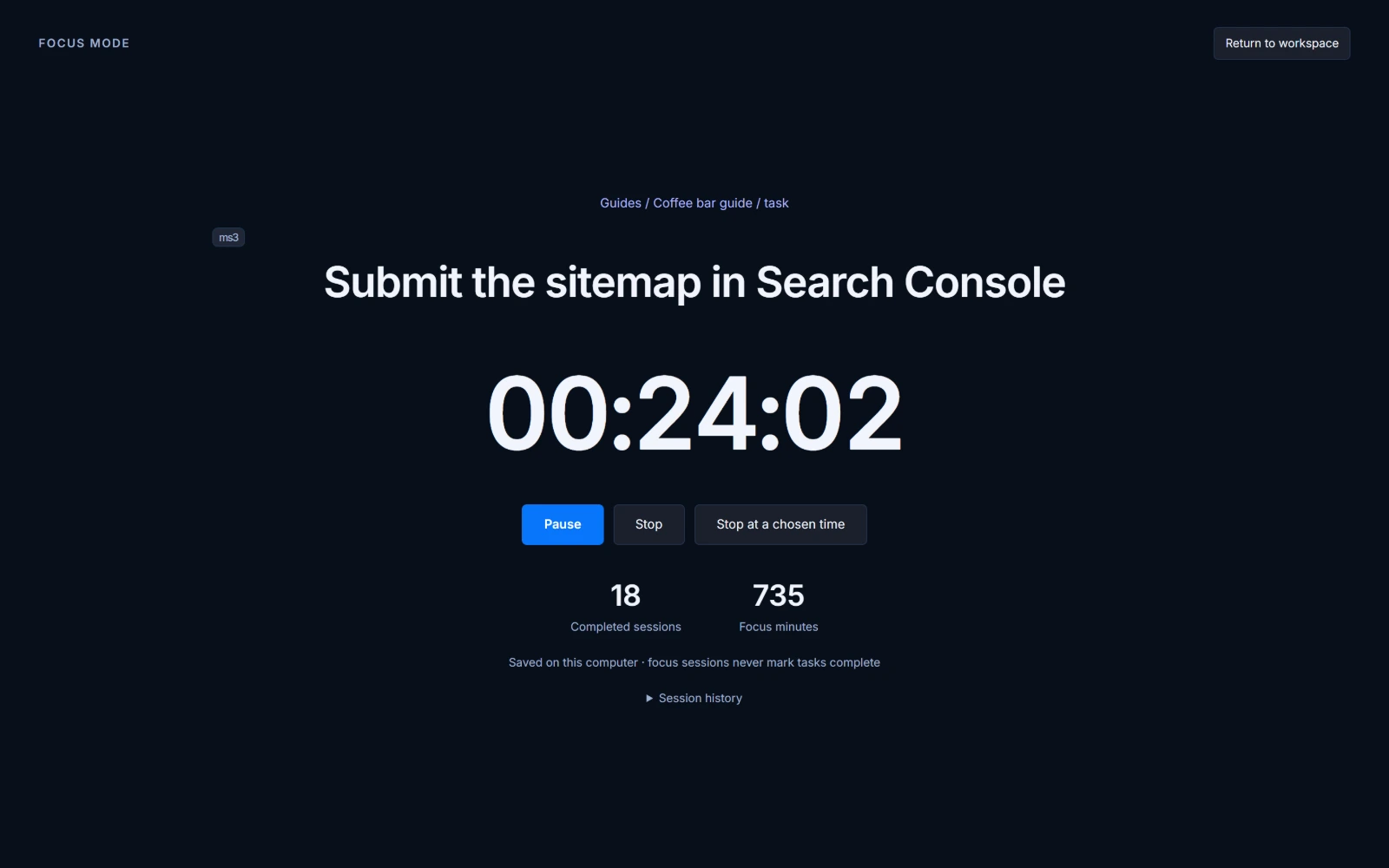
Focus mode for a made-up task, Submit the sitemap in Search Console: a timer running at 00:24:02 with Pause, Stop and Stop at a chosen time, 18 completed sessions and 735 focus minutes, saved on this computer (demo data)
See the full screenshot →

Know where your time went.

Start a timer on a task, a milestone or a project. Project HQ keeps the time log on your PC, with totals per week, month and year. Export it as a CSV file. A timer never marks a task done.

Dennis Jonkman

Why I built Project HQ

I tried ChatGPT the week it came out. Three years ago I started using it for my business. One year ago I got serious about it.

Then the trouble started. AI makes it easy to start things, so I started a lot of things. After twenty chats, I no longer knew where I left off.

Even with one project, I kept asking: "Claude, how far are we now?" "ChatGPT, which tasks are still open?" I ended up with separate dashboards for my personal life, my work and my side projects. And I did not want Trello, or another monthly bill for a tool I would stop using.

Then I saw how big companies keep track of everything: one dashboard that shows where each project stands. I wanted that for myself. I also learned how the pros set up a project: a clear end goal, milestones, regular commits, and the right workflow for each kind of task. Doing all that by hand for every new project took too long. That's when I knew I needed a better way.

Now I open one page. It shows where I am, what to work on next and which tasks are due this week. My AI updates the project files while it works, and Project HQ shows the result when I open it. A new project? One button copies a setup prompt, and my AI sets it up the right way.

That's Project HQ. With it, you work the way the pros do from day one.

What you get

Project HQ

One dashboard for every project you run with AI.

Included

  • Every project on one screen: progress, open tasks, milestonesInstead of opening each folder, file and chat to piece it together
  • Progress read from your project filesInstead of keeping a separate task app up to date by hand
  • Today's #1, picked across all your projectsInstead of deciding again every morning where to start
  • One-click done, with UndoInstead of editing status files yourself
  • Ask Claude and Ask ChatGPT: a ready prompt with the goal, next step and open tasksInstead of explaining the project again in every new chat
  • Waiting on you: every decision only you can make, in one listInstead of finding out a week later that a project stalled on you
  • Runs on your PC: no cloud, no online account, no subscriptionInstead of sending your project data to another service

€37one-time, incl. VAT

No subscription. 30-day money-back guarantee.

Join the waitlist

Good to know before you buy

  • Windows only. There is no Mac or Linux version.
  • You need Claude, Codex or ChatGPT to set your projects up. Your AI subscription is separate.
  • It runs on one PC, for you. It is not a team or cloud tool.
  • Your project files stay on your PC.

30-day money-back guarantee

Not for you after all? Email us within 30 days of buying and you get your full €37 back. No questions asked.

Questions

Is this a monitor for my AI chats?

No. Claude and other tools can show which chat is waiting for a reply. Project HQ shows each project's goal, progress, next step and the decisions only you can make. It works across Claude, Codex and ChatGPT.

Do I have to keep it up to date?

No. You don't type your work into Project HQ. Your AI assistant keeps each project's status file up to date as it works. Project HQ reads that file. It reads the files when you open it or press Refresh.

What does it cost?

€37 once, incl. VAT. No subscription. If it's not for you, you get your money back within 30 days.

Will it work for me?

It fits if three things are true. You work on a Windows PC. Each project is a folder on that PC. And you use Claude Code, Codex or ChatGPT to move your projects forward. It doesn't fit if you need a Mac version, a team tool or access from another device. Not sure? The 30-day guarantee covers it.

Is my data safe?

Project HQ runs on your own PC. Your project files stay there. Nothing goes to a cloud service. Project HQ makes no AI calls of its own. It sits behind a password and only accepts connections from your own PC. Changes to a project file go through a safe path, with a backup and a conflict check.

Does Project HQ use AI itself?

No. It copies prompts that you paste into Claude or ChatGPT. It never sends anything to an AI service.

Does it work on a Mac?

No. Project HQ is Windows only.

When can I buy it?

It isn't on sale yet. Join the waitlist and you'll hear when it is.

Who makes Project HQ

Dennis Jonkman

Dennis Jonkman

I run several projects at the same time, and Claude Code and Codex do much of the work on them.

I built Project HQ for myself, so I could see on one screen where each project stands. MethodKeep is my one-person business in the Netherlands.

More about Project HQ and MethodKeep →

See every project on one screen.

One email when it's on sale. No spam.

Project HQ isn't on sale yet. Join the waitlist and you'll hear when it is.